CHECK 1
Connected equipment
List every Ethernet endpoint, identify which devices require PoE and allow for any planned spare ports.
Automation and SCADA planning guide
Start with the network requirement, not the feature list. Port count, PoE load, VLANs, monitoring, fibre topology and recovery requirements should all be confirmed before a managed switch is selected.
ERAITOK application guide · Updated 14 September 2026
The short answer
A managed industrial Ethernet switch is worth reviewing when the network design needs configurable VLANs, status monitoring, access controls, traffic management or a supported resilient-ring method. An SFP fibre uplink by itself does not make a switch managed. The final choice still depends on the complete topology, power, environment and project approval requirements.
Six project checks
CHECK 1
List every Ethernet endpoint, identify which devices require PoE and allow for any planned spare ports.
CHECK 2
Confirm whether cameras, controllers, operator stations or other traffic must be separated with configurable VLANs.
CHECK 3
Define the status and diagnostic information the project expects to collect through SNMP, the web interface or other listed management methods.
CHECK 4
Confirm the number of SFP links, fibre type, compatible SFP modules and whether the network is point-to-point, a chain or a ring.
CHECK 5
Use the project topology and recovery target to decide whether STP, RSTP or ERPS ring protection is required.
CHECK 6
Check DC power, PoE load, cabinet protection, temperature and every project-specific approval before ordering.
Managed model comparison
The summary below is for initial selection. Review the complete English datasheet and confirm the project configuration before ordering.
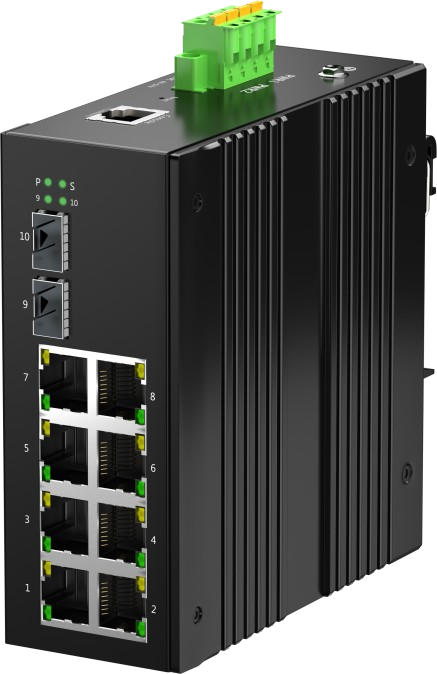
Review this model when eight PoE ports, two SFP slots and Layer 2 management are required.
View IES-2F8E-P-M2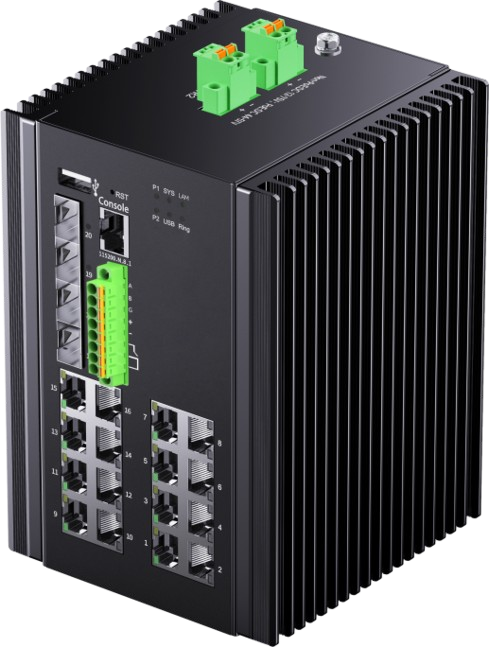
Review this model when the project needs higher port density, four SFP slots or the listed industrial I/O and network functions.
View IES-4F16E-P-M2Both models list a total PoE budget of up to 240 W. The connected-device load, the switch's own consumption and the external DC supply must be checked together; the number of PoE ports alone does not confirm that every connected load can be powered at its maximum value.
Review PoE power budget and DC supply planning →Product capability
Project boundary
Common selection questions
No. SFP slots accept compatible fibre transceivers; they do not determine whether the switch is managed. IES-2F8E-P has two SFP slots without configurable Layer 2 management, while IES-2F8E-P-M2 adds the listed managed functions.
Consider a managed model when the design calls for configurable VLANs, network monitoring, traffic controls, access controls or a supported resilient-ring method. A simple isolated network may not need those functions.
No. Modbus support is listed for IES-4F16E-P-M2, but the system integrator must still confirm protocol use, topology, software interaction, cybersecurity requirements and project approvals.
No. IP40 is not an outdoor-weather rating. Rain, dust ingress or exposed installations require a suitable protective enclosure and a separate environmental review.
Related planning guide