CHECK 1
Powered-device count
Allow for the installed cameras or other compatible PoE devices and any planned spare ports.
Security network planning guide
Start with the number of powered devices, required PoE load, uplink type and network-management needs. This guide compares ERAITOK models for protected, cabinet-based security networks.
Reviewed by the ERAITOK technical team · Updated 14 September 2026
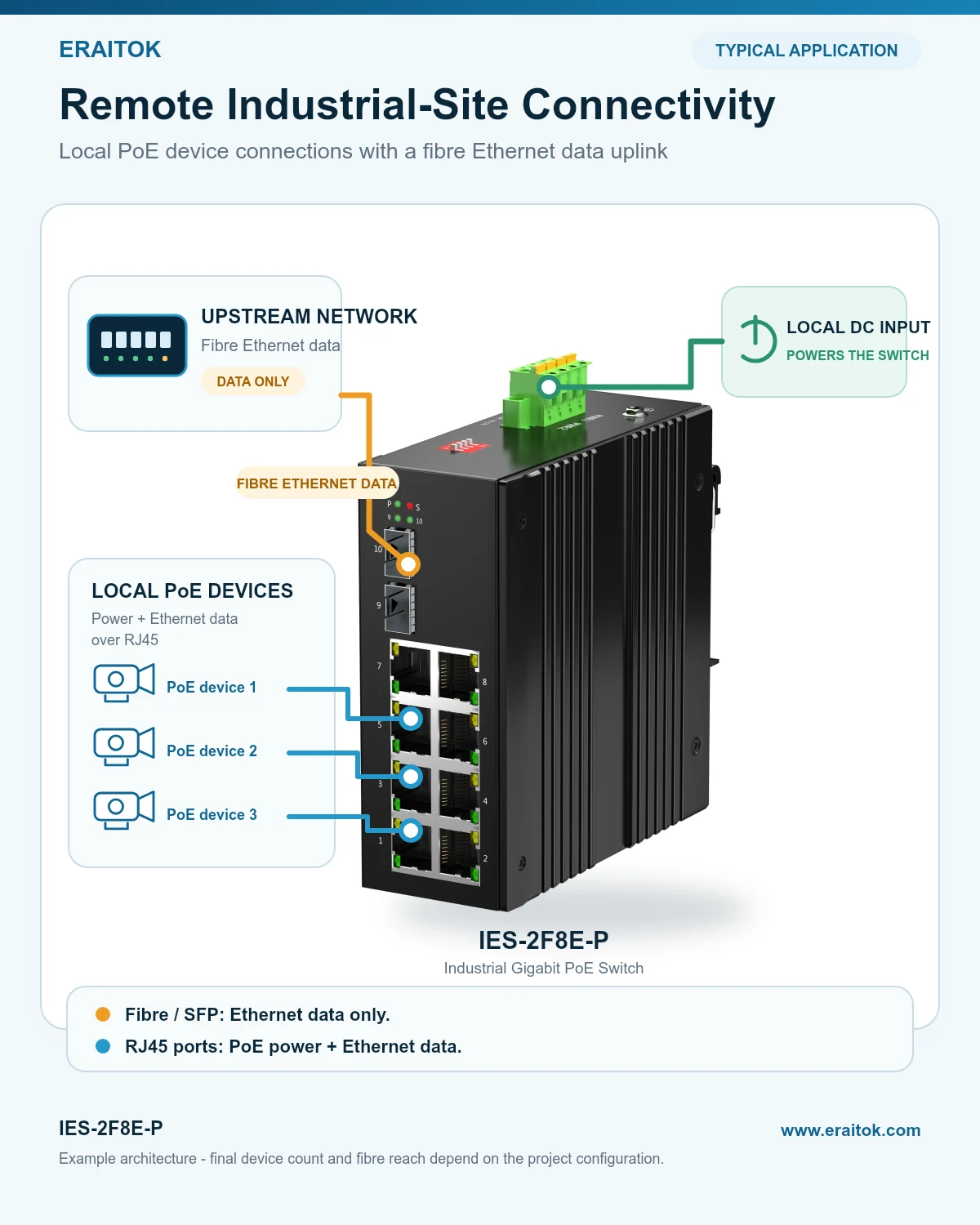
Example architecture
A roadside, tunnel-side or utility-corridor cabinet may need to connect several PoE cameras while returning Ethernet data over fibre. In this example, the IES-2F8E-P is powered by a suitable local DC supply, the cameras receive power and data through RJ45, and the SFP uplink carries Ethernet data to the upstream network.
Four selection checks
CHECK 1
Allow for the installed cameras or other compatible PoE devices and any planned spare ports.
CHECK 2
Check the total required PoE load and size the external DC power supply for switch consumption plus the required load.
CHECK 3
Choose RJ45 for copper-only layouts or an SFP-equipped model when the project requires a fibre Ethernet uplink.
CHECK 4
Use an unmanaged model for simple deployment or a managed model when the project requires VLAN, monitoring or ring protection.
Model comparison
Compact 4-device PoE edge
Copper-only PoE network; any RJ45 can be the uplink
8-device network with fibre uplinks
Managed 8-device network
Managed 16-device network
IES-8E-P has eight PoE-capable RJ45 ports. Any port can be used for an Ethernet uplink; when one port is used for the uplink, seven ports remain available for other connected devices.
Not sure which model fits? Request a preliminary configuration review →Remote SC fibre option
For two local PoE devices at a remote site, the matched IES-1F1E and IES-1F2E-P pair carries Ethernet data over SC fibre and supplies PoE locally from IES-1F2E-P. Review the dedicated solution page for the power boundary, fibre configurations and transmission-distance options.
Review the paired SC fibre media convertersProject review